
Talk to an expert
Portal
Talk to an expert
  • Home
  • Products
    • Logic+ Software
    • SMART Technology
    • Documentation
  • About
  • Contact
  • Home
  • Products
    • Logic+ Software
    • SMART Technology
    • Documentation
  • About
  • Contact

Introduction

3
  • Logic+ Introduction
  • Quick Start Guide
  • Installation

Schedule Manager

4
  • Schedule Manager
  • Enterprise Project List
  • List of Schedules
  • Project Wizard

Schedule Viewer

5
  • Schedule Viewer
  • Schedule Viewer Actions
  • File History
  • Activity History
  • Activity Details

Analytics

2
  • Analytics Reports
  • ChartViewer Options

Delay Analysis

5
  • Delay Analysis
  • Traceback
  • Traceback Candidates
  • Delay Analysis Chart
  • Delay Analysis Dashboard

Settings

2
  • Traceback settings
  • Licence Information

Training Videos

4
  • Logic+ Overview
  • Schedule Manager
  • Schedule Viewer
  • Delay Analysis
  • Home
  • Docs
  • Logic+
  • Introduction
  • Quick Start Guide
View Categories

Quick Start Guide

< 1 min read

Quick Start Guide #

LWARE Logic+ is used to view and analyse project schedule files.

  1. Installation: Get a license key and install Logic+
  2. Schedule Files: Have a copy of two schedule files for the same project
  3. Project Wizard: Use the Project Wizard to create a project and load schedule files
  4. User Documentation: Available on the lware website.

Logic+ Modules

There are four main modules to be familiar with:

Schedule ManagerCentralized access and organization of project schedules and files Load files from Oracle Primavera P6, Asta Powerproject, and Microsoft Project
Schedule ViewerVisualization and comparison of schedule data
AnalyticsInsightful reporting on schedule trends, performance, and forecast accuracy
Delay AnalysisIdentification and visualization of delay sources and critical path impact

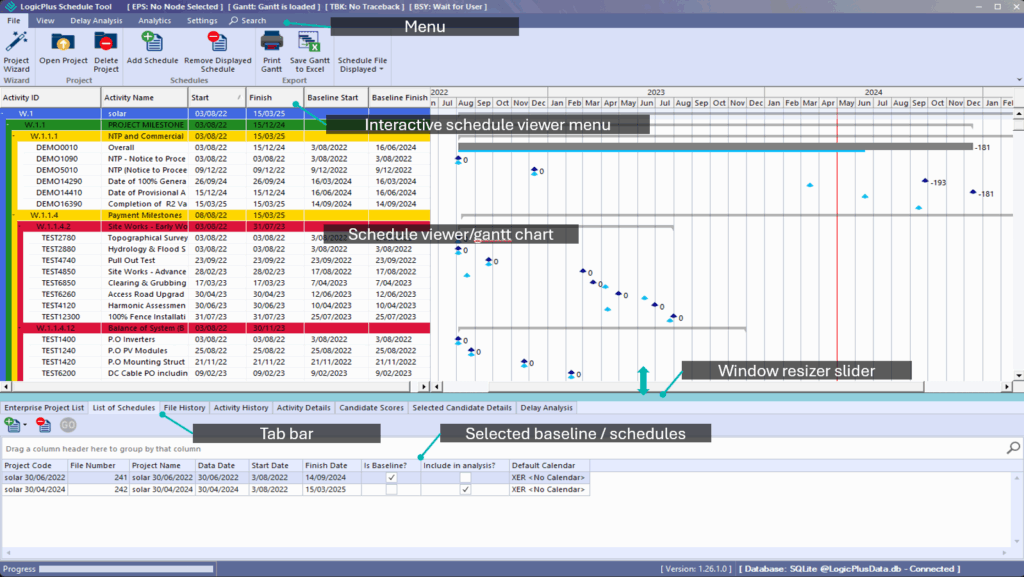
Navigation terminology

The below outlines the terminology used throughout the Logic+ user documentation and guides:

Quick Reference Guide Download #

LWARE Logic+ Quick Reference Guide – August 2025Download

Still stuck? How can we help?

How can we help?

Updated on September 18, 2025
Table of Contents
  • Quick Start Guide
  • Quick Reference Guide Download

Head Office

Level 7, 303 Coronation Drive
Milton QLD 4064 Australia

Home     |     Logic+     |     SMART     |     Documentation     |     Privacy Policy     |     Terms & Conditions

© 2025 LWARE Pty Ltd  |  Digital Marketing by Focused Marketing

  • Follow