
Scheduler Viewer Overview #
Use the Scheduler Viewer to view and analyse your schedule files.
Logic+ allows you to import and view a wide range of schedule file formats, including XER and MPP. Additionally, you can open schedule files from the same project that are in different formats, making it easy to analyze and compare any differences between them.
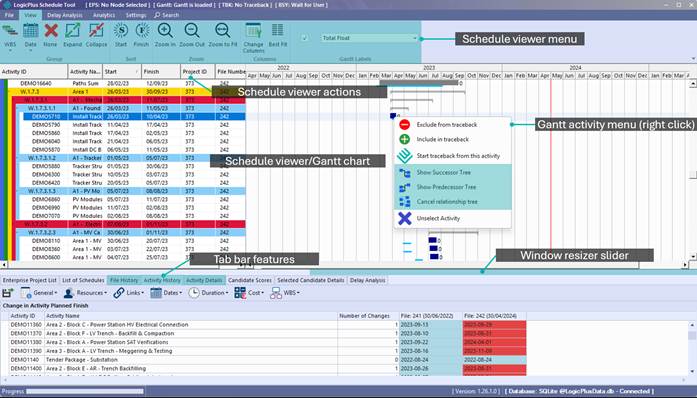
After you have loaded schedule files, the Schedule Viewer will display activities details and a gantt view. (See List of Schedules and Project Wizard to understand how to load and maintain your project schedule files).
Key features of Schedule Viewer include:
- Schedule view/gantt view
- Schedule viewer actions
- File History
- Activity History
- Activity Details
The default display will show the work breakdown structure (WBS), activity ID, activity name, and the start and finish of activities by month of the year.
The Gantt View displays the following:
- Baseline file activities (light blue line)
- Activity details of the schedule with the latest data date (if you selected multiple schedule files for analysis).
- Delays can easily be visualised where the baseline has shifted from the activity.
This visualises when activities start later than planned, continue beyond the finish date, or impact the commencement of future activities, affecting the overall project timeline.
Schedule Viewer Feature Overview #
| Schedule Viewer/Gantt View Legend | In normal schedule viewer mode (traceback has not been run), the following legend applies to activities in Gantt view: Blue bars: Activities from the selected schedule Green bars: Added activities post-baseline Light blue line: Baseline schedule reference Dark grey bars: Excluded activities 💡 To change the displayed schedule file: File menu > Schedule File Displayed |
