
Talk to an expert
Portal
Talk to an expert
  • Home
  • Products
    • Logic+ Software
    • SMART Technology
    • Documentation
  • About
  • Contact
  • Home
  • Products
    • Logic+ Software
    • SMART Technology
    • Documentation
  • About
  • Contact

Introduction

3
  • Logic+ Introduction
  • Quick Start Guide
  • Installation

Schedule Manager

4
  • Schedule Manager
  • Enterprise Project List
  • List of Schedules
  • Project Wizard

Schedule Viewer

5
  • Schedule Viewer
  • Schedule Viewer Actions
  • File History
  • Activity History
  • Activity Details

Analytics

2
  • Analytics Reports
  • ChartViewer Options

Delay Analysis

5
  • Delay Analysis
  • Traceback
  • Traceback Candidates
  • Delay Analysis Chart
  • Delay Analysis Dashboard

Settings

2
  • Traceback settings
  • Licence Information

Training Videos

4
  • Logic+ Overview
  • Schedule Manager
  • Schedule Viewer
  • Delay Analysis
  • Home
  • Docs
  • Logic+
  • Analytics
  • ChartViewer Options
View Categories

ChartViewer Options

< 1 min read

Chart Export Options #

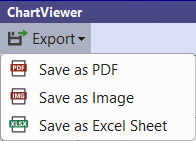
After running a report, the chart can be exported to PDF, Image or Excel Sheet.

Select ‘Export’ from the top left corner then the required ‘Save as’ option:

  • Save as PDF: Save as Image: Option to save chart as PNG or JPG file.
  • Save as Excel Sheet: Exports the data used to generate the chart. Use the ‘Save as PDF’ or ‘Save as Image’ if you need the chart visualisation.
Schedule File Options #

When an analytics report is run, all schedule files that are currently open will be included in the analytics.

Use the checkboxes on the top right corner of the Chart Viewer to hide/unhide files included in the chart visualisation:
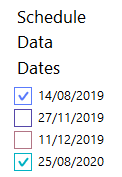

Chart Tooltips #

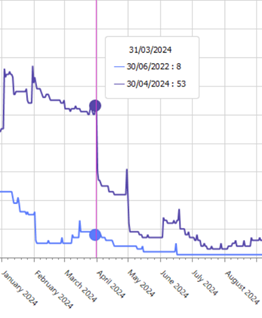
When viewing analytics, a tooltip will appear when you mouse hover over chart details:

Still stuck? How can we help?

How can we help?

Updated on August 23, 2025
Table of Contents
  • Chart Export Options
  • Schedule File Options
  • Chart Tooltips

Head Office

Level 7, 303 Coronation Drive
Milton QLD 4064 Australia

Home     |     Logic+     |     SMART     |     Documentation     |     Privacy Policy     |     Terms & Conditions

© 2025 LWARE Pty Ltd  |  Digital Marketing by Focused Marketing

  • Follow