Candidate Scores #
It is the top ranked activity from the candidate scores that is used on the critical path. You can select any activity on the critical path to see the top ranked candidate as well as the alternate candidates and analyse the scoring for all the attributes.
➡️ Navigation: Bottom tab panel > Candidate Scores
Analyse top ranked candidate #
👉 Click on an activity on the critical path
The selected activity row will be highlighted in grey and the activity flashes to indicate it is selected for candidate analysis.
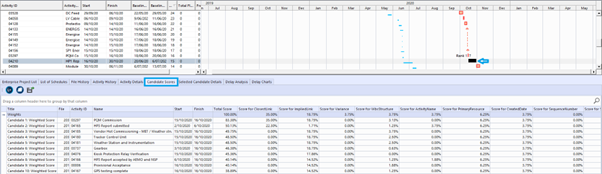
👉 On the bottom bar tab, click on Candidate Scores tab
The top 10 predecessor candidate scores for the selected activity are shown. The candidates are coloured orange, higher scores correspond to darker colours. For each candidate, the source file, activity, score for each attribute and total score are displayed.
Analyse alternate candidates #
👉 You can also scroll through the Gantt view to see the alternate candidates for the selected activity:

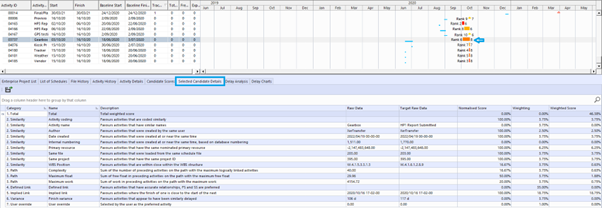
Selected Candidate Details #
➡️ Navigation: Bottom tab panel > Selected Candidate Details
👉 To see the detail of each candidate, click on the ranked candidate predecessor in the Gantt view
👉 The details appear in the bottom tab bar, Selected Candidate Details tab.