Talk to an expert
Portal
Talk to an expert
  • Home
  • Products
    • Logic+ Software
    • SMART Technology
  • About
  • Contact
  • Home
  • Products
    • Logic+ Software
    • SMART Technology
  • About
  • Contact

Getting Started

7
  • Getting Started
  • Timeline
  • Map Tools
  • Exclusion Zones
  • Workzones
  • Schedule Analysis
  • Alert Management

Analytics

4
  • Analytics
  • Data Health
  • Resource Metrics Table
  • Planned vs Actual

SMART Administration

4
  • Managing SMART
  • Project Settings
  • Device Management
  • User Management
  • Home
  • Docs
  • SMART
  • Analytics
  • Resource Metrics Table
View Categories

Resource Metrics Table

< 1 min read

0:00 / 0:08
  • View as Markdown Open this page as plain Markdown (opens in a new tab)
  • Open in ChatGPT Ask questions about this page (opens in a new tab)
  • Open in Claude Ask questions about this page (opens in a new tab)
  • Open in Google AI Studio Ask questions about this page (Google account required) (opens in a new tab)

The Resource Metrics Table is a special analytics view, and will be the first thing you see when opening up an ongoing SMART project.
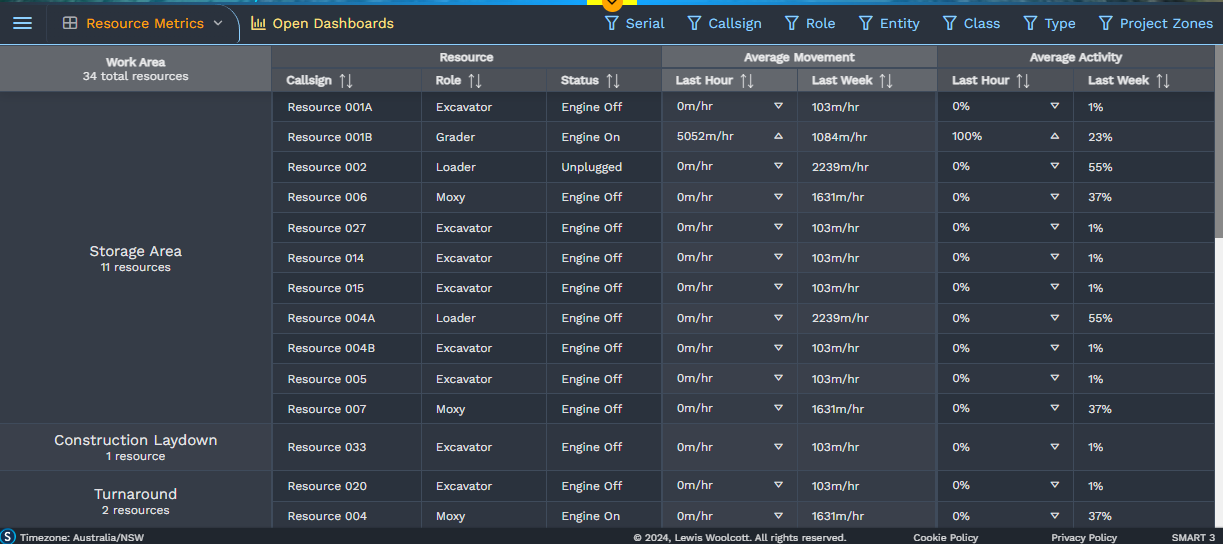

A screenshot of the Metrics Table within SMART
Still stuck? How can we help?

How can we help?

Updated on July 4, 2025
Data HealthPlanned vs Actual

Head Office

188B Barry Parade
Fortitude Valley QLD 4006 Australia

Home     |     Logic+     |     SMART     |     Documentation     |     Privacy Policy     |     Terms & Conditions

© 2026 LWARE Pty Ltd